First published as a LinkedIn video on January 5, 2026, recorded the evening before. Rewritten for this site in October 2026. Code for the first project: azure-da-mcp/content-authoring-eval at release v1.0.1 (0aacf6d). The harness from the second project isn't public.
What changed since January
These two projects were the start of a run. Two weeks later I turned the harness idea into a plan for a continuous running agent that finds its own work. Later that month I had my harness and agent build a Playwright demo and present it back to me, and in February I wrote about making these AI development modules reusable instead of rebuilding them each time. The continuous agent grew into version 2.1 by April.
The rest of this page is how each project works and what it taught me.
1. An evaluator that blends a deterministic scan with an agent's score
I've been playing with deterministic and agentic capabilities around DA Live for a while. An agent here means a program where the model decides its own next step. Deterministic means the good old workflows, written as code with libraries, that do the same thing every time. The first project mixes the two on purpose.
A user puts in a set of links: PDFs, HTML pages, the original content and the migrated page. Four agents assess the page: structure, accessibility, content fidelity and visual correctness. I built it in Next.js, because it gives you a nice UI with shadcn, it's popular with the AI coding community, and it does everything I need. Instead of a database I used session storage and local storage. Instead of a fancy separate backend I used Next.js's own API routes. And to add a little fun, server-sent events stream results back, so the UI talks to the backend a lot while a batch runs.
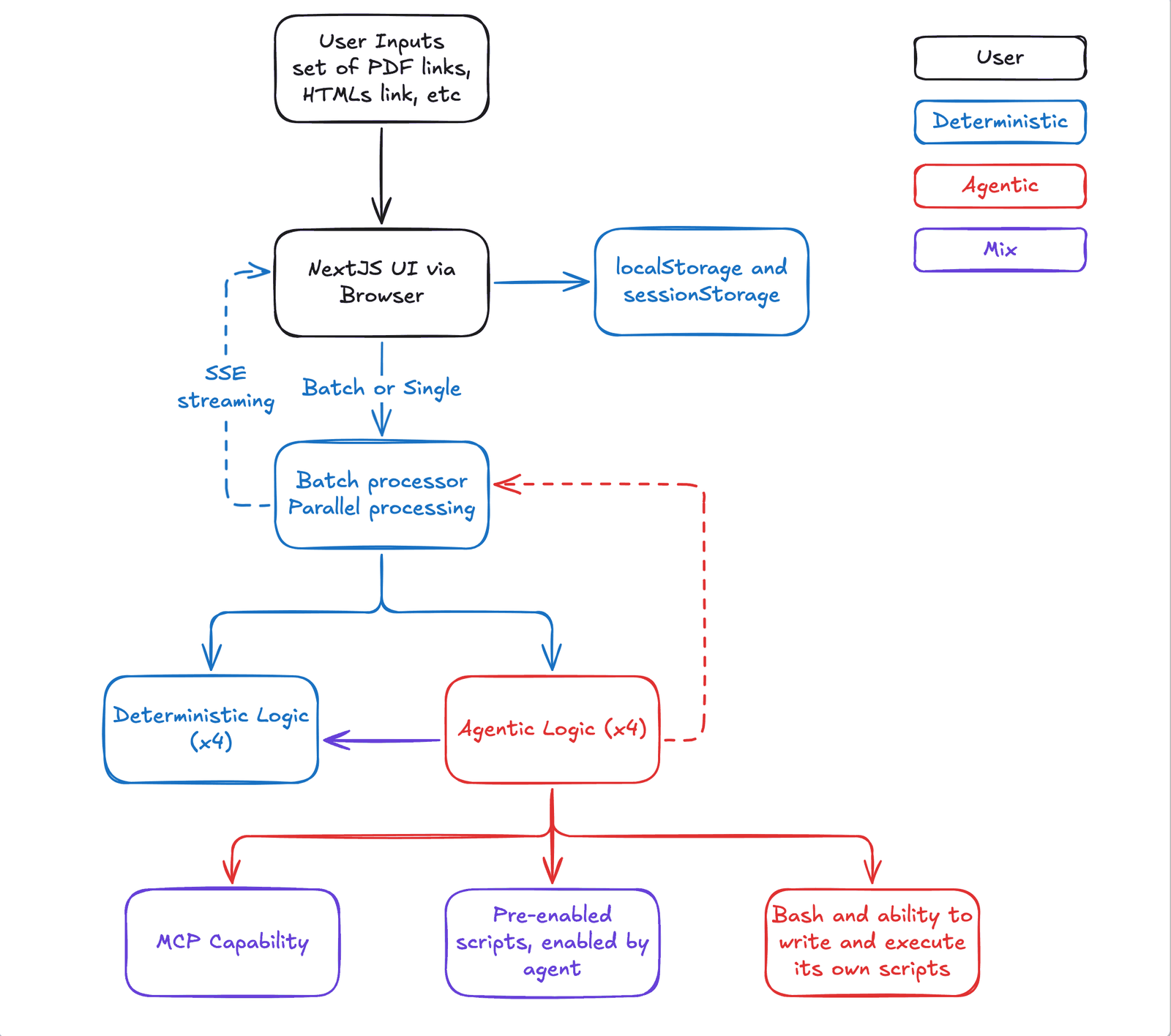
Most of my time went into the backend. Each of the four agents runs its deterministic step first: Cheerio parses the HTML for structure, axe-core scans accessibility, unpdf pulls text out of the PDF, and Playwright with pixelmatch captures and compares screenshots. Those return numbers, booleans and lists, with no interpretation. Then the agent gets those results in its prompt, goes and looks at the live page with its own tools, and writes the findings, the recommendations and a score.
Then deterministic code puts it back together. The final score for each agent is 70% the agent's judgment and 30% the scan:
/** * Calculate final score by combining deterministic and agentic scores * 70% agentic (Claude's user-impact assessment) + 30% deterministic (automated scan) */function calculateFinalScore( deterministicScore: number, agenticScore: number): number { // Weighted combination: 70% agentic + 30% deterministic const finalScore = Math.round(agenticScore * 0.7 + deterministicScore * 0.3); return Math.max(0, Math.min(100, finalScore));}And if the agent step fails, the scan's result stands on its own. Below are the repo's own two functions with the numbers from one of its tests: the scan scores a page 65, the agent scores it 45. Drag either score to see that the agent's number moves the result more than twice as much as the scan's. Then tick the failure box to see what the report falls back to.
A test in the repo uses this example: the scan scores the page 65, the agent scores it 45. With JavaScript on, you can move both scores and make the agent step fail.
What each side contributes
agent × 0.7scan × 0.3
Math.round(45 * 0.7 + 65 * 0.3)
= Math.round(51)
= 51
Final score 51, needs improvement
70% of the agent's 45 plus 30% of the scan's 65. The agent's lower score pulls the result 14 points under the scan.- excellent90 and up
- good75 to 89
- acceptable60 to 74
- needs improvement40 to 59
- criticalbelow 40
This is the mix I was after. Deterministic code kicks off the agents, the agents work from deterministic results, and deterministic code takes the agents' output and assembles the final report. There are lots of reasons to keep parts of a system deterministic. When the agent misbehaves, the report still has numbers in it. On January 1, I tagged release 1.0.1 and the containers went out to my free Oracle Cloud VM.
Watch this part0:16 Two projects, and the evaluator1:12 Deterministic steps in the backend
2. Three levels of agent capability, from MCP tools to writing its own code
The agents can do three kinds of things. In the board above they're the three boxes along the bottom.
First, MCP. The Model Context Protocol is how an agent gets tools, and with the Claude Agent SDK each agent can use a set of MCP servers. The important one is Playwright, which gives the agent eyes: it can open the page in a real browser, see the work, and check its own logic against what's actually there.
Second, scripts written ahead of time. Beyond MCP tools, I wanted scripts that already exist, for the AI to decide to use when it's appropriate. Say an agent can choose between scripts one, two and three based on the criteria it's assessing. It can look at a page and decide this one needs script two and script three, and that choice is the important part.
Third, writing and running its own code. This one is arguably the most dangerous, but also the most interesting. There was a talk from someone at Anthropic recently about how giving agents the ability to write code and execute it on the fly makes them much more capable. You're not asking someone to do work without letting them write code themselves. This is where I did the most experimenting. Here's how every agent is started:
// Stream messages from Claude with tool access for await (const message of query({ prompt: userPrompt, options: { model: 'claude-sonnet-4-5-20250929', maxTurns: 20, systemPrompt: systemPromptText, mcpServers, permissionMode: 'bypassPermissions' as const, allowDangerouslySkipPermissions: true, cwd: process.cwd(), } })) {The mcpServers line hands over Playwright and a filesystem server. bypassPermissions means the agent doesn't stop to ask before it runs a Bash command. That's only something I'd do on a machine I trust enough, and the release runs in a Docker container on that Oracle VM. The prompts tell each agent what's worth running. The structure agent, for example, is told to run lighthouse --only-categories=seo <url> --output=json --quiet through Bash, and to open the page with Playwright and inspect the live DOM before it gives its assessment.
Watch this part2:01 MCP and Playwright2:24 Scripts written ahead of time2:53 Writing and running its own code
3. Long build sessions, with the work handed to sub-agents
How I built this one isn't too different from most of my AI coding projects, with one big change: Claude does the long working sessions. My longest session on this project ran an hour and 45 minutes.
The technique is a mini agent harness. Claude does the orchestration, but its context window barely fills up, because all the building work is handed off to sub-agents. A sub-agent is a separate agent session with its own context window. Each one takes a piece end to end, and in total they can run for many hours. That's a big improvement over what I did before, when I was doing the planning, the refinement and the task-level work myself.
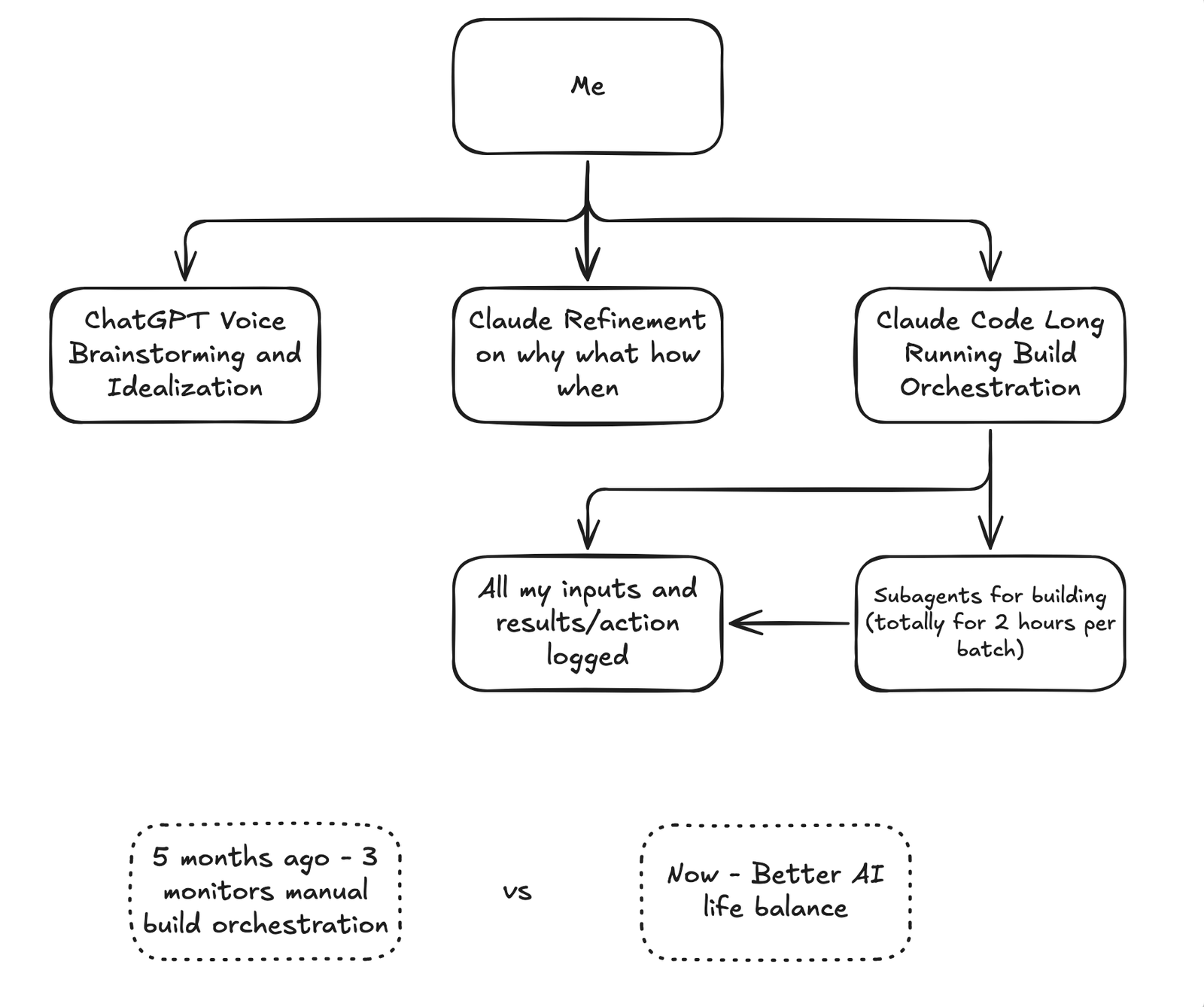
Five months before this, I ran three agents at the same time, by hand, on three monitors, and I was the orchestrator. It was a lot of work. With sub-agents, a build ran for two hours on its own and I didn't need to be at the desk.
Watch this part3:37 How I built it4:34 Three agents by hand, five months before
4. A harness that builds software, and the requirements I gave it
The second project shifts from building a piece of software to building a harness that builds software. A harness, in this sense, is the code around the agents: the loop, the order they run in, what they hand each other and how the work gets checked. One file goes in, a full solution comes out, and it runs for hours, possibly days if you have the tokens.
There's a lot of talk right now about agent harnesses, the Ralph loop and a bunch of other ideas. I drew on those, on my own earlier projects (two versions of spec-driven development and the sub-agent orchestration above), on the BMAD and Spec Kit projects, and on years of consulting work in content management systems.
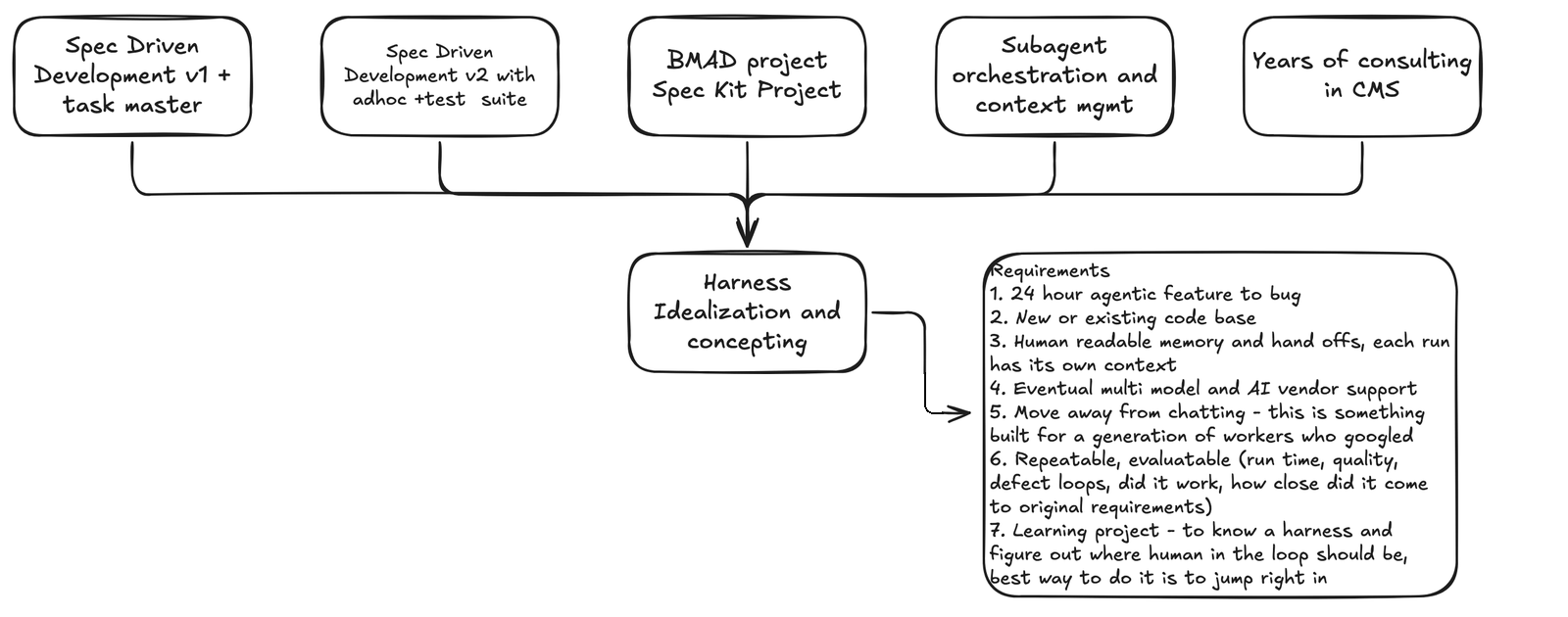
I came up with a set of requirements:
- A 24-hour agentic run, from feature to bug.
- Works on a new or an existing code base.
- Human-readable memory and handoffs, and each run has its own context.
- Eventually, support for multiple models and AI vendors.
- Move away from chatting. This is built for a generation of workers who googled.
- Repeatable and evaluable: run time, quality, defect loops, did it work, and how close it came to the original requirements.
- A learning project. The best way to understand a harness, and to figure out where the human in the loop should be, is to jump right in.
Then I had Claude build it. This one was a lot more hands-on for me. I wasn't writing the code, but I was watching every line of code and reading every single prompt and refining it. The first build cycle took some time, me and the AI refining it together, because I had a good idea of how it should be done. I was guiding the AI on how to build a harness.
Watch this part5:03 A harness that builds software5:48 The requirements5:59 Having Claude build it
5. Running on main while improving the next run on develop
Once it was built and running, this was the first time I had a real reason to use branches in my solo projects. The agent on main runs for hours. The first run took six hours to finish. While it runs, a develop branch off main holds the next run's improvements. Any immediate bug fix that needs a restart of the build goes into main. Every enhancement for the next run goes into develop.
In a second VS Code window, my agent and I read the handoff documents of the run in progress. That's why one of my requirements is that every AI handoff is human readable. Me and the AI were looking at the memory, the logs and how the AI proceeded with each step, and optimizing it for the next run while the first one was still going.
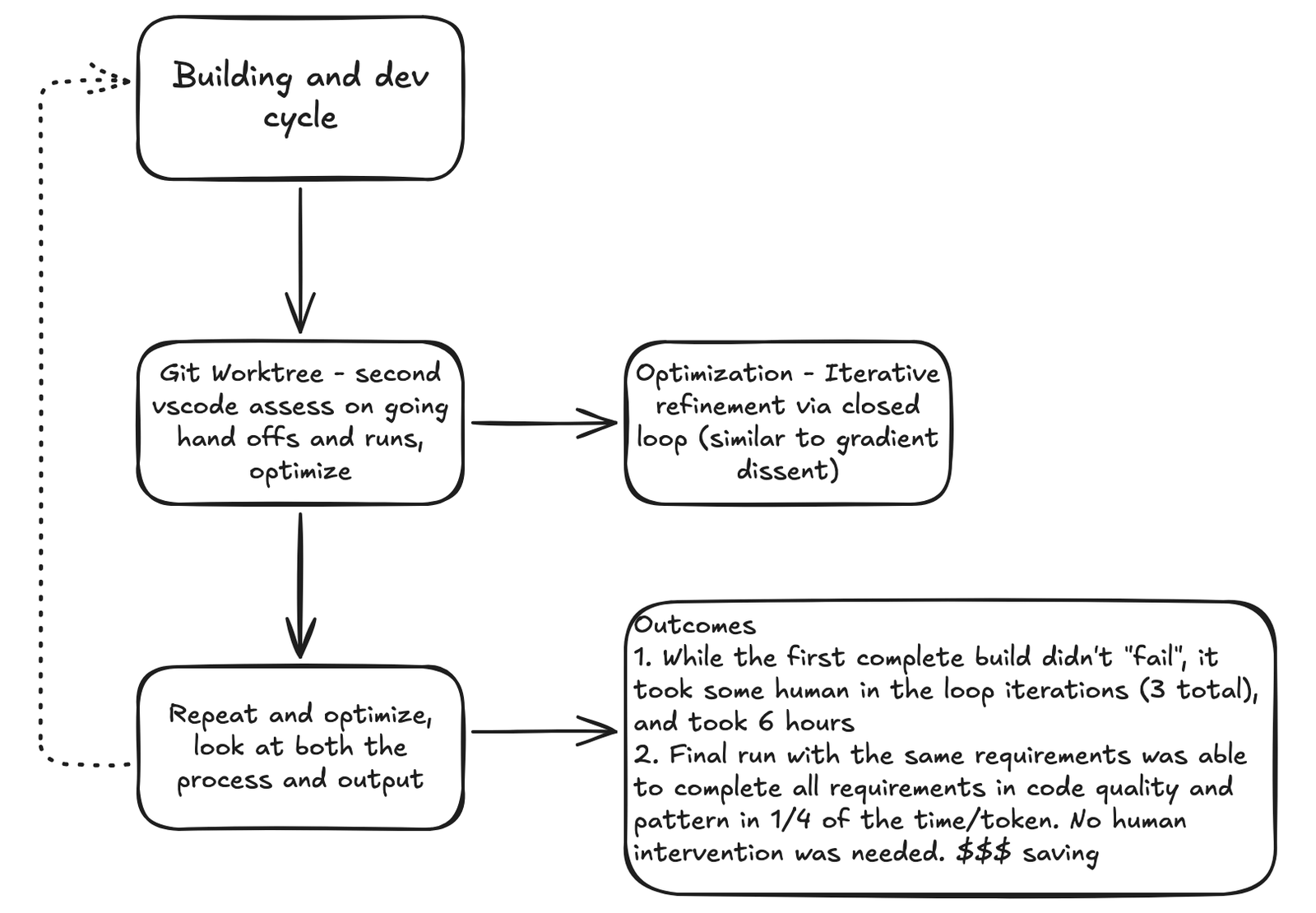
The outcomes: the first complete build didn't fail, but it took six hours and three rounds of me stepping in. The second run, with the same requirements, finished in about a quarter of the time and tokens, met all the requirements on code quality and patterns, and needed no human intervention. I saved a lot of money.
Watch this part6:22 Running on main, improving on develop7:20 Six hours, then a quarter of the time
6. A deterministic loop where defects become subtasks
What I built is a long-running session. I want to move away from chat. I don't even start the run myself anymore. I have the AI launch it, log it and monitor it.
The loop itself is deterministic. It decides which agent runs next and walks through them. I made it deterministic because I don't want the AI to give up easily. Each run starts with four separate planning agents, and they run in exactly this order: why, what, how, when. I've done this planning by hand quite a few times, and the order matters. Without the how, the when doesn't know how big to break down each task.
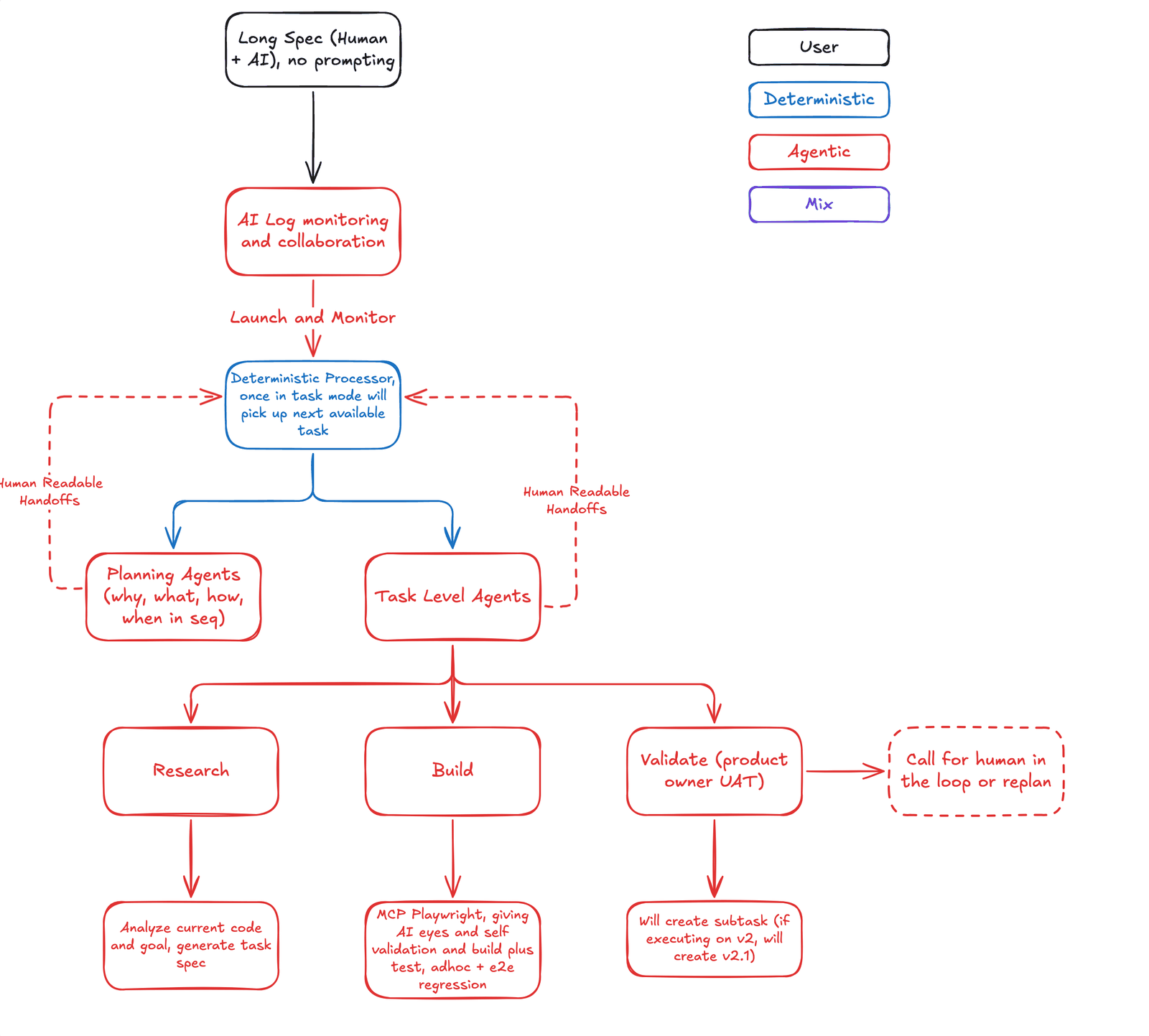
Then the task-level agents run, one task at a time for now. There's room for optimization there. The research agent looks at the current code and the goal and produces a really good functional spec for the task. The build agent builds it. It has MCP and Playwright, so it can test what it's building, and that's really important. It also has to keep a solid regression test suite and do a bunch of ad hoc testing while it builds.
The validation agent is one of the most important parts. In my manual builds, I was the one validating what the AI built, and I logged defects whenever it didn't give me what I expected. So I dedicated an agent to that job. When it finds a defect on task 2, it creates task 2.1, or 2.1 and 2.2. When task 2 is done, the deterministic loop checks whether 2.1 or 2.2 exists before it moves on to task 3. So even a deterministic loop can pick up the validator's handoff. To the loop, a subtask is just the next task.
Below is a simplified model of that ordering rule, not the harness code. It starts with the case from the video, task 2 coming back with a defect. Change what the validator finds on any task and the run order on the right updates: each subtask lands right after its parent, before the next planned task.
Planning agents, once per run
- why
- what
- how
- when
What the validator finds on each task
- Task 1passes
- Task 21 defect
- Task 3passes
- Task 4passes
The order the loop runs them
Run order 1, 2, 2.1, 3, 4: the defect on task 2 became task 2.1, and the loop ran it before task 3.
- 1
- 2
- 2.1
- 3
- 4
loop: run planning agents in order: why, what, how, when
loop: next available task is 1
  validate: passed
loop: next available task is 2
  validate: 1 defect logged, created 2.1
loop: 2.1 exists, so it runs before 3
loop: next available task is 2.1
  validate: passed
loop: next available task is 3
  validate: passed
loop: next available task is 4
  validate: passed
loop: no tasks left, run complete
On the board, the validator also has a dashed box: call for a human in the loop, or replan. That's the future state. If the build drifts far enough from the original vision, say ten steps back the plan no longer fits, the validator should be able to trigger a replan so the roadmap realigns before the next iteration. I hadn't built that yet.
Watch this part7:47 Why the loop is deterministic8:04 Planning: why, what, how, when8:31 Research and build agents8:53 The validator turns defects into subtasks
7. What the harness still doesn't do
Next for me is to keep building the harness and integrate it with other work, because understanding comes from doing and building.
What I didn't get to: the task agents still run one at a time, the replan step is only a dashed box, and the harness code isn't something I've published. If you've built a harness with a replan step, I'd like to know how you decide when the drift is big enough to stop and replan.